


iMazing 3.5.2: iPhone 17e Support, Device List Customization, Spyware Analyzer Updates, and Photos Privacy Controls
iMazing 3.5.2 adds support for the latest Apple hardware, brings new interface customization, new privacy controls in Photos, expands Spyware Analyzer threat detection, adds new emojis and better WhatsApp Business support and ships several targeted fixes.
New Hardware Support
iMazing 3.5.2 adds full support for iPhone 17e and iPad Air M4. Recovery and DFU mode are now also supported for MacBook Air M5, MacBook Pro M5 Pro and M5 Max, and MacBook Neo.
Home Screen: Column Customization
The Devices and Backups sections now support column customization in list view, letting you choose exactly which device or backup properties are shown at a glance.
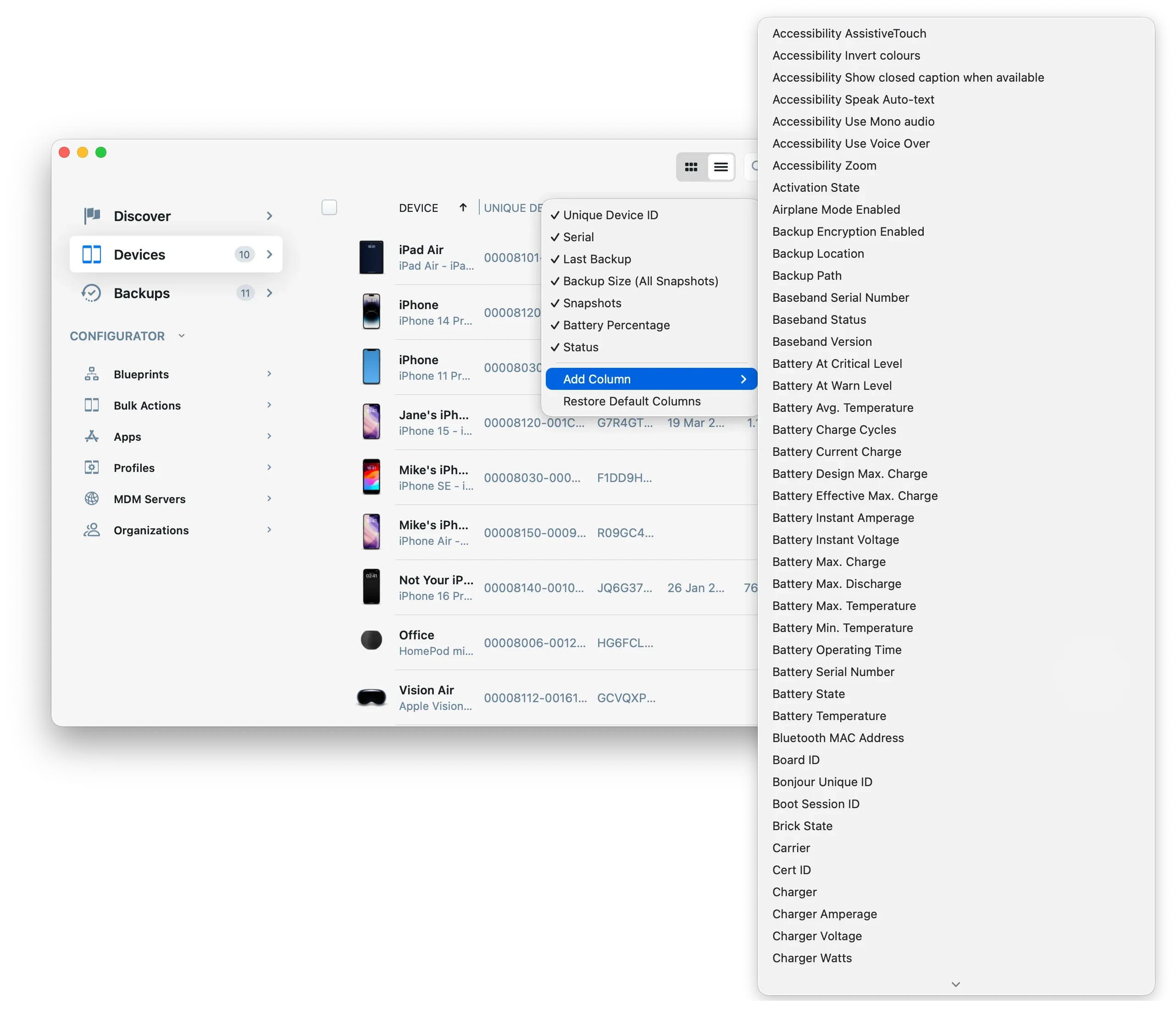
iMazing 3.5.2's new column customization feature
Photos: New Privacy Controls
Two new options have been added to iMazing Preferences for workflows where discretion around visual content matters:
- An option to hide full-resolution photos and videos in detail view
- An option to change how thumbnails are processed, or to turn them off entirely
Both settings are accessible from iMazing Preferences and take effect immediately.
Spyware Analyzer: New Threat Detection
The Spyware Analyzer adds two new sets of indicators of compromise, keeping iMazing current with the latest known threats:
- DarkSword, discovered by Google, iVerify, and Lookout
- Coruna / CryptoWaters, discovered by Google and iVerify
For users who rely on iMazing to audit device integrity, these additions expand coverage without any action required.
Messages and WhatsApp: Improvements
Messages and WhatsApp both gain the latest emojis from iOS 26.4. Messages also adds improved support for "Business" messages.
Tools: Battery and Storage Shortcuts
Two new shortcuts have been added to the Tools section for faster access to key device data: Battery Health & Diagnostic and Storage Usage, both linking directly to their respective sections in the Device Overview. Battery diagnostic data is also now saved in iMazing's cache.
CLI: Library Management Commands
Five new commands expand iMazing CLI's library management capabilities, giving IT administrators and developers programmatic control over profiles and supervising organizations:
--library-import-profileand--library-remove-profileto manage configuration and provisioning profiles--library-import-organizationand--library-remove-organizationto manage supervising organizations--library-create-organizationto create a supervising organization from a PKCS 12 identity file
Windows: Bonjour Fix
iMazing no longer installs Apple's Bonjour package on Windows 10 or 11, where it can conflict with native mDNS support. Bonjour remains available on Windows 7 and 8 where it is still required. Users on Windows 10 or 11 can safely uninstall Bonjour.
Wi-Fi Connection Issues: Wi-Fi Private Address Option
If you experience Wi-Fi connection issues with iOS 26.4 on Windows or macOS, try turning off the iOS Private Wi‑Fi Address option (iOS Settings app > Wi‑Fi > Select Wi‑Fi network > Private Wi‑Fi Address > Select Off). Read our dedicated blog post on this topic.
Update to 3.5.2 Today
iMazing 3.5.2 is available as a free update for all iMazing 3 users.
Download iMazing 3.5.2 for macOS and Windows
iMazing 3.5.2 Release Notes
New hardware Support
- Added support for iPhone 17e and iPad Air M4
- Added support for MacBook Air M5, MacBook Pro M5 Pro/Max, and MacBook Neo when in Recovery or DFU mode
Interface Improvements
Home Screen Devices and Backups sections:
- Added column customization in list view, allowing you to choose which device or backup properties are displayed
Photos
- Photos: Added a new option in iMazing Preferences to hide full-resolution photos and videos in detail view — useful for some sensitive tasks
- Photos: Added a new option in iMazing Preferences to change how thumbnails are processed, or to turn them off entirely — useful for some sensitive tasks
Spyware Analyzer
- Spyware Analyzer: Added indicators of compromise for DarkSword discovered by Google, iVerify, and Lookout
- Spyware Analyzer: Added indicators of compromise for Coruna / CryptoWaters discovered by Google and iVerify
Messages & WhatsApp
- Messages and WhatsApp: Added the latest emojis from iOS 26.4
- Messages: Improved support for "Business" messages
Tools
- Tools: Added "Battery Health & Diagnostic" (shortcut to Device Overview Battery section)
- Tools: Added "Storage Usage" (shortcut to Device Overview Storage section)
- Battery diagnostic data is now saved in iMazing's cache
- Added support for detecting jailbroken status with palera1n
- Backup Locations: On macOS, iMazing now reports the total available space on the main hard drive by including space the system can purge and retrieve by offloading data to iCloud, similar to what Finder reports
CLI Commands
Added new CLI commands:
--library-import-profile --profile-path <file_path>.mobileconfigto import a configuration or provisioning profile in iMazing's library--library-remove-profile --profile-id <profile_id>to remove a profile from iMazing's library--library-import-organization --organization-path <file_path>.organization --organization-password <org_password>to import a supervising organization exported from iMazing or Apple Configurator 2 into iMazing's library--library-create-organization --p12-path <file_path>.p12 --organization-name <org_name> --p12-password <pcks12_password>to create a supervising organization from a PKCS 12 identity file into iMazing's library--library-remove-organization --organization-id <org_id>to remove a supervising organization from iMazing's library
Fixes
- Messages: Fixed an issue with phone number matching that could lead to different conversations / chat sessions from being incorrectly merged
- Photos: Fixed incorrect pixel values in bright areas of HEIC files that caused issues when converting to JPEG or PNG
- Fixed crash on Windows 7
- Fixed a rare Windows crash caused by “RemoteApp and Desktop Connections”
- Fixed a rare issue that could lead to device snapshot list from being constantly refreshed in loop
- The iMazing installer no longer installs Apple’s Bonjour package on Windows 10 or 11 for device discovery and connection over the local Wi-Fi network. It is only required on Windows 7 and 8, and it can conflict with native Windows mDNS support on Windows 10 and 11. We recommend uninstalling Bonjour on Windows 10 and 11.